Introducing AI Workflows
AI Workflows let you automate repeatable hosting jobs with plain-language instructions instead of code or fragile drag-and-drop builders. Trigger messages on key events, chain AI actions and integrations, and run multi-step processes — like confirming checkout, scheduling a cleaning, and creating a restock task — from one place, with approval steps where you want them.
Hosting operations break down when every process lives in a different tool, depends on a different person, or only happens when someone remembers to do it. AI Workflows gives you one place to automate those repeatable jobs with plain-language instructions instead of code or fragile drag-and-drop builders.
Automate anything with AI Workflows
With AI Workflows, you can create automations for the work you already do every day:
- Send messages when important events happen
- Create cleanings automatically after bookings or checkouts
- Notify the right teammate when something needs attention
- Trigger review, task, and operations flows without manual follow-up
The goal is simple: less clicking, less context switching, and fewer things slipping through the cracks.
Describe what you want in plain language
The biggest change is how workflows get built.
Instead of manually stitching together logic, conditions, and actions, you describe the workflow in plain English and the AI Builder creates the steps, chooses the right tools, and wires the logic together for you.
That means no code, no complex setup, and no long onboarding curve just to automate basic operations.
Trigger workflows from real events
AI Workflows can run when it actually matters:
- A reservation is created
- A guest sends a message
- A cleaning is completed
- A schedule-based automation fires
Because the workflows are event-driven, they fit the rhythm of day-to-day hosting instead of forcing your team to remember manual checklists.
Chain powerful actions together
Each workflow can combine 20+ built-in tools across messaging, tasks, cleanings, reviews, and more. Data carries forward from one step to the next, so a single workflow can handle an entire sequence rather than a single isolated action.
For example, one workflow can:
- Detect that a guest has checked out.
- Notify the assigned cleaner.
- Create or update the cleaning record.
- Alert your team if the clean is delayed.
That kind of chaining is what turns automation from a convenience into a real operational system.
Preview first, then activate
Before you switch a workflow on, you can preview it with real data and run it once to confirm the logic is right. When it looks good, enable it and let it keep running automatically.
That preview step matters. It lets you move fast without wondering whether the workflow will behave the way you intended.
Track every execution
Every workflow run includes a visible execution log so you can see what the AI agent did, which guest or property it acted on, and whether the run succeeded.
That gives you transparency instead of black-box automation. You can automate aggressively without losing visibility.
A practical example
Try a workflow like this:
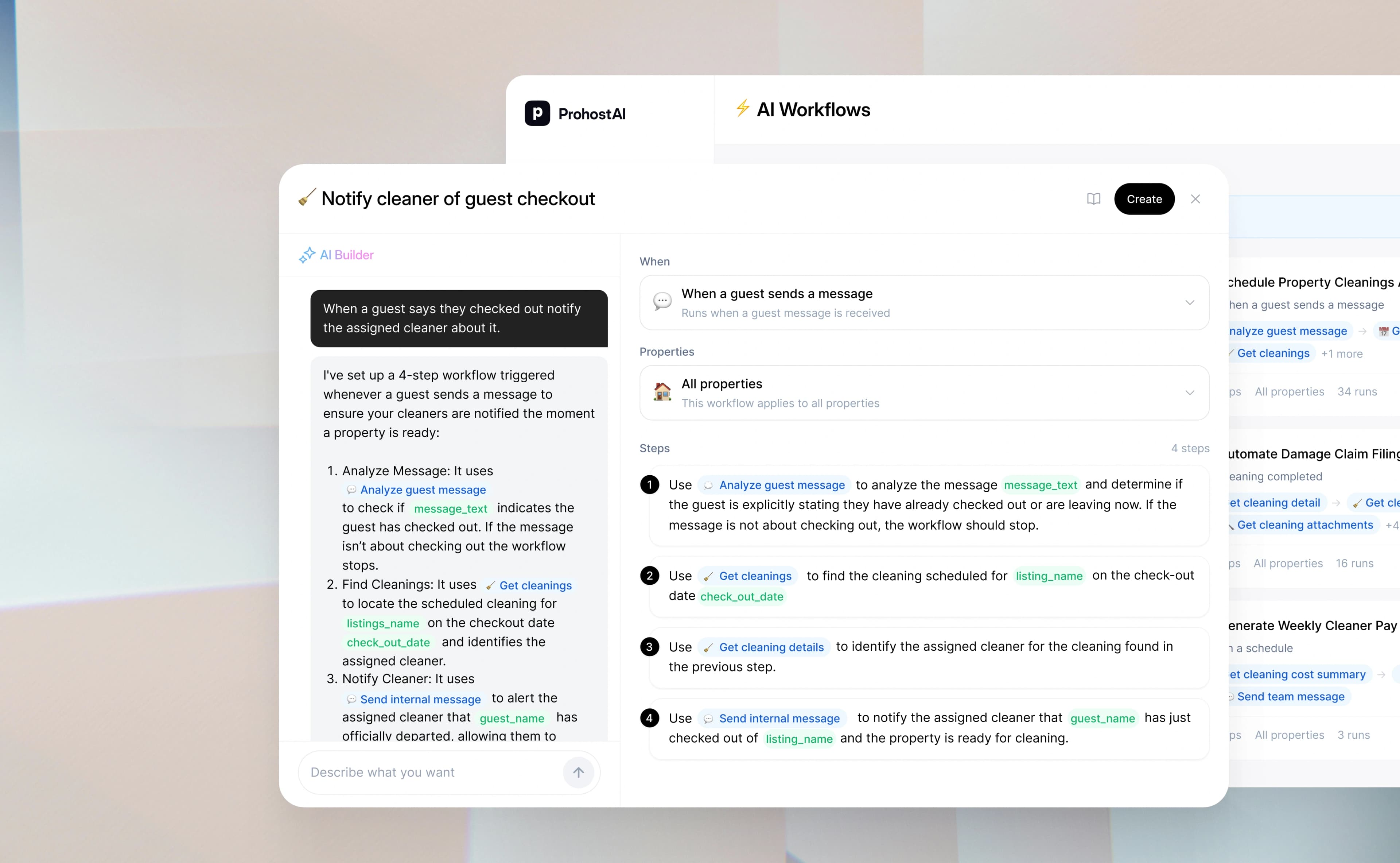
When a guest says they checked out, notify the assigned cleaner about it.
That one instruction can become a real workflow with the right trigger, the right message, and the right operational follow-up without you building the logic by hand.
Ready to automate your operations?
If your team is still coordinating routine work manually, AI Workflows is the fastest way to reduce that overhead.